

Guide · Scriptwriting

How to write an explainer video script.

The script decides whether an explainer works long before anyone animates a frame. Almost every effective explainer follows the same four-part shape. Here it is, with a template you can fill in today.

  • The four-part structure
  • Word counts for 30, 60 and 90 seconds
  • A fill-in-the-blanks template
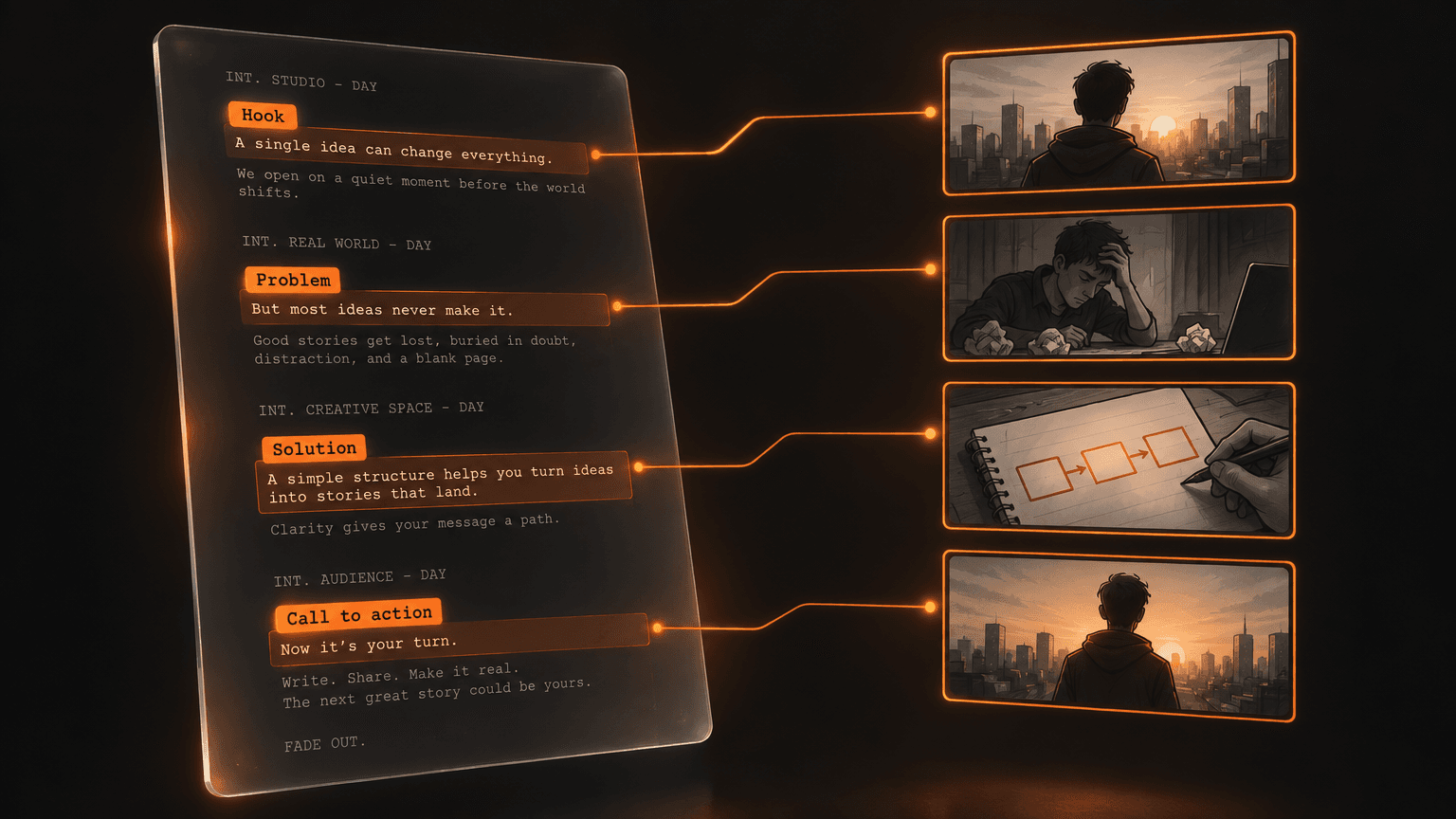
How to write an explainer video script: Hook, problem, solution, call to action: each beat of the script mapped to its scene.Illustrative frame
Hook, problem, solution, call to action: each beat of the script mapped to its scene.

This guide, as a storyboard

The short version.

The key points of this guide, laid out the way we would storyboard them for a video.

Plan mine
  1. How to write an explainer video script: scene 1, HookIllustrative frame
    01 · 0–5s

    Hook

    Name the viewer's problem in their words. If they nod, they keep watching.

  2. How to write an explainer video script: scene 2, ProblemIllustrative frame
    02 · 5–20s

    Problem

    Make the cost of the problem concrete: time, money, stress.

  3. How to write an explainer video script: scene 3, SolutionIllustrative frame
    03 · 20–50s

    Solution

    Introduce the product as the answer, and show three benefits, not ten features.

  4. How to write an explainer video script: scene 4, Call to actionIllustrative frame
    04 · 50–60s

    Call to action

    One next step. Not three. Match it to the page the video lives on.

The four-part structure

Hook, problem, solution, call to action. It sounds basic because it is: the structure works because it mirrors how people decide. First they need to feel the video is about them, then that the problem is worth solving, then that your product solves it, and finally what to do next. The same four beats carry a landing page video or a SaaS explainer.

  • Hook (about 10% of the runtime): a line your buyer would say themselves.
  • Problem (about 25%): the cost of the current way, made specific.
  • Solution (about 50%): your product, through benefits tied back to the problem.
  • Call to action (about 15%): a single, clear next step.

How many words you need

Natural narration runs at roughly 130 to 160 words per minute, which is why explainer video length and word count are the same decision. Explainers need room for visuals to breathe, so aim a little lower than you think.

  • 30 seconds: about 60 to 75 words
  • 60 seconds: about 120 to 150 words
  • 90 seconds: about 180 to 220 words

A template you can fill in

Hook: "[Your buyer] spends [time or money] on [problem]." Problem: "Between [painful step], [painful step] and [painful step], [bad outcome]." Solution: "[Product] [does the core thing], so you can [benefit one], [benefit two] and [benefit three]." Call to action: "[Start your free trial / book a demo] at [where]."

Fill it in, read it aloud with a timer, then cut every word that does not earn its place. Most first drafts lose a third of their words and get better for it. Short scripts also keep what an explainer costs down, because every scene is work.

Mistakes that make viewers leave

Avoid these and your script will already beat most explainers online. Or let us write it as part of the film.

  • Opening with your company name instead of the viewer's problem
  • Listing features instead of showing outcomes
  • Jargon your buyer would never use
  • Trying to speak to every audience at once
  • Ending with several calls to action

When we make it for you

  • Discovery call with your team
  • Script written to time
  • Storyboard matching each line to a scene
  • Script revisions before production starts
  • Voiceover-ready final script

Produced on SurgeScribe

Our own engine, so revisions never break what you approved.

Most AI video tools generate a fresh take every time you ask for a change. We built SurgeScribe to work the other way: every scene is exact, every change is precise, and every version is kept.

See exact frames before it renders

Every scene is built as a validated document on SurgeScribe, so the frames you approve in preview are the frames in your final film. No surprises at delivery.

Revisions change only what you asked

Your note becomes one precise edit. The rest of the film does not move, re-roll or drift, so approving something means it stays approved.

Your brand, locked in

Logos, colours, fonts, voices, characters and music live in one brand library, so every video you order looks and sounds like the last.

Every version saved

Each revision is kept and restorable. Update a screen next quarter or bring back last month's ending without starting over.

How it works

From your first message to final files.

  1. 01

    Brief

    You fill in the form. We reply with questions, a plan, a timeline and a fixed quote.

  2. 02

    Script and storyboard

    We write the script to time and storyboard every scene. You approve before production starts.

  3. 03

    Preview

    We produce the film on SurgeScribe and send exact preview frames. Your notes become precise edits.

  4. 04

    Delivery

    Final renders in every format you need, plus the project kept for quick future updates.

Questions, answered.

Anything else? Ask in the form and we will answer with your quote.

Should I write the script myself?
You know the product best, so your draft is valuable. A professional writer's job is to cut it down and make it land. We are happy to start from your draft.
How long should the hook be?
One sentence, ideally under five seconds. Its only job is to make the right viewer think "this is about me".
Should the script mention competitors?
Usually not by name. Describe the old way of doing things instead; it is more relatable and avoids legal risk.
Can you write the script for us?
Yes. Every explainer we produce includes the script and storyboard.

Keep exploring

Rather have it made for you?

A few lines in the form is enough. We reply with a plan, a timeline and a fixed quote.

How to Write an Explainer Video Script (With Template) · SurgeScribe